
今回は、サイト内で一覧リンクで別アドレスのWordPressサイトの記事一覧を表示
タイトル部分をクリックでリンクサイトを表示する方法が簡単だったので記事にしました。
WordPress REST APIを利用して、記事のサムネイル画像を取得する方法です。
簡単なのでよかったら参考にしてください。
今回は以下のような一覧リンクを作成しました。
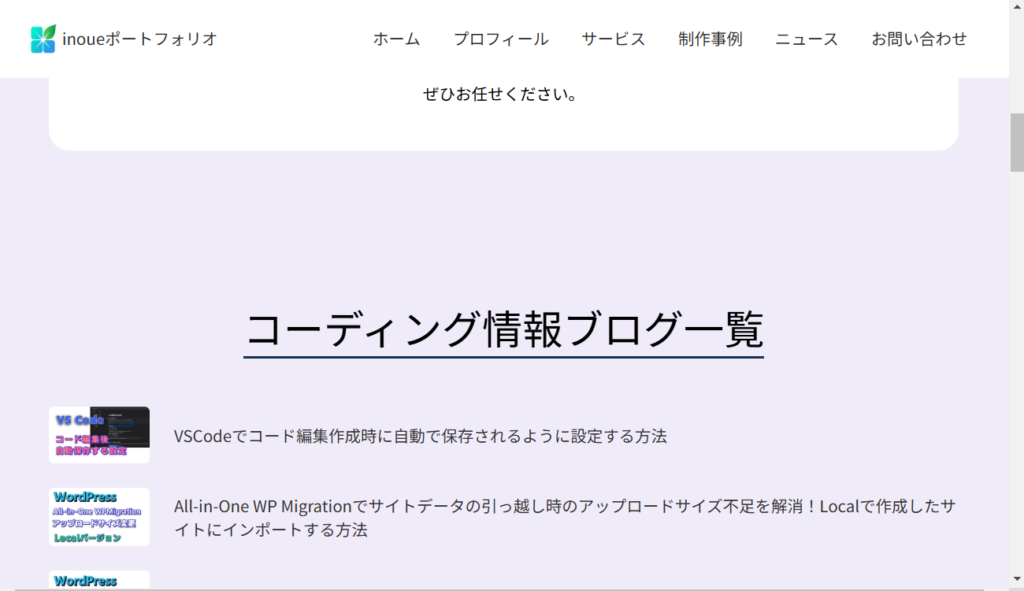
今回作成したコード
functions.php・front-page.php・cssで実装しました。
以下が今回作成したコードになります。
functions.php
functions.php
// ===========================
// 他サイトの記事のサムネイル画像とタイトル取得表示
// ===========================
function display_a_site_posts() { //取得するサイトアドレス
	$response = wp_remote_get('https://inopro.jpn.org/wp-json/wp/v2/posts?per_page=5&_embed');

	if (is_wp_error($response)) {
			return '';
	}

	$posts = json_decode(wp_remote_retrieve_body($response));

	if (empty($posts)) {
		return '';
	}
	$output = '<ul style="list-style-type: none; padding: 0;">';
	foreach ($posts as $post) {
		$thumbnail = '';

		//サムネイル画像を取得
		if (isset($post->_embedded->{'wp:featuredmedia'}[0]->source_url)) {
			$thumbnail = '<div class="post-thumbnail" style="flex-shrink: 0; margin-right: 1.5rem;">';
			$thumbnail .= '<a href="' . esc_url($post->link) . '" target="_blank">';
			$thumbnail .= '<img src="' . esc_url($post->_embedded->{'wp:featuredmedia'}[0]->source_url) . '" alt="' . esc_attr($post->title->rendered) . '" style="width: 100px; height: auto;" >';
			$thumbnail .= '</a>';
			$thumbnail .= '</div>';
		}

		$output .= '<li style="display: flex; align-items: center; margin-bottom: 1.5rem;">';
		$output .= $thumbnail;

			$output .= '<div class="post-content">';
			$output .= '<a href="' . esc_url($post->link) . '" target="_blank" class="post-title" style="text-decoration: none; color: #333; font-size: 16px;>';
			$output .= esc_html($post->title->rendered);
			$output .= '</a>';
			$output .= '</div>';
			$output .= '</li>';
	}
	$output .= '</ul>';
	return $output;
}

//ショートコードで利用可能にする
add_shortcode('a_site_posts', 'display_a_site_posts');
front-page.php
front-page.php
<?php
$a_site_posts = do_shortcode('[a_site_posts]');

if (!empty($a_site_posts)) : ?>
<section>
  <h2 class="headline inopro-posts-headline">コーディング情報ブログ一覧</h2>
  <div class="inopro-posts">
    <?php echo $a_site_posts; ?>
  </div>
</section>
<?php endif; ?>
main.css
main.css
.inopro-posts-headline {
  padding-top: 6rem;
  margin-bottom: 3rem;
}

.inopro-posts ul {
  width: 90%;
  margin: 0 auto;
}

.post-thumbnail img {
  border-radius: 5px;
  transition: .6s;
}

.post-thumbnail img:hover {
  transform: scale(1.1);
}

.post-content {
  display: flex;
  flex-direction: column;
  justify-content: center;
}

.inopro-posts .post-title {
  text-align: left;
  transition: .6s;
}

.inopro-posts .post-title:hover {
  opacity: .5;
}

コメント